Graphic design is a unique field; despite the fact that graphic design is a highly competitive industry, many designers happily share advanced tips and techniques in the form of tutorials. That paves the way for novice designers to learn the skills needed to become master designers. In fact, you can earn an entire design education simply by following along with graphic design tutorials, especially Photoshop tutorials. When you can then apply what you’ve learned to other designs, you’re able to expand your reach and command more clients (and more money) with your new skills. Start being a better graphic designer today with the following 10 new Photoshop tutorials.
It’s tough to take portrait photos without reflection or glare, but you can retouch shiny skin with this Photoshop tutorial posted on PetaPixel.
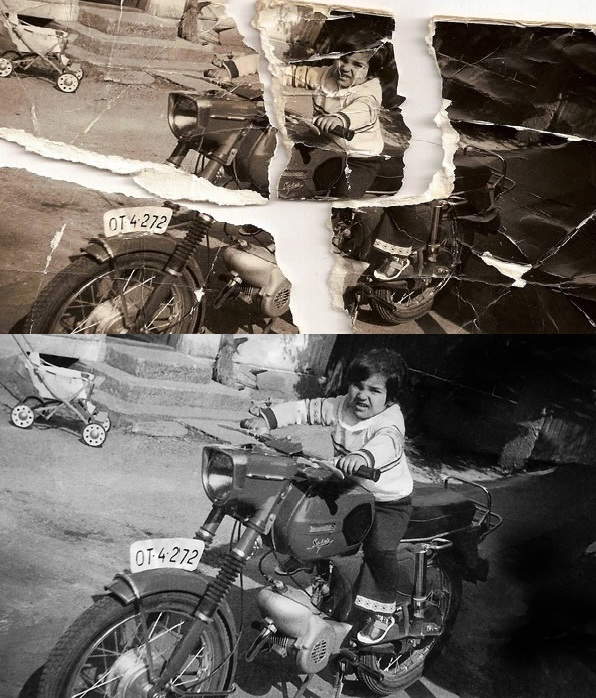
2. Restore Heavily Damaged with Photoshop
This free Photoshop tutorial from PSD Tuts Plus walks you through the process of restoring heavily damaged photos. Check out the before and after.
3. Add Landscape Water and Reflection
Learn how to add realistic water and reflections to your landscapes with this free Photoshop tutorial published by Digital Camera World.
4. Make Teeth Whiter with Photoshop and Lightroom
IceFlow Studios shows you how to whiten teeth for any subject using the suite of tools afforded by Photoshop, with a dash of Lightroom.
5. Create Powerful Macro Effects with Photoshop
PhotoshopDaily walks you through the process of creating powerful macro effects with Photoshop. The technique allows you to enhance details in one area of your photos while blurring the rest so users’ eyes are focused where you want them to be.
6. Turn a Portrait into Pop Art with Photoshop
Turn any portrait subject into convincing pop art with the techniques you’ll learn in this tutorial, courtesy of DesignCuts.
Craft a realistic 3D-layered text effect with this tutorial featured on PlanetPhotoshop.
8. Create a Star Logo with Photoshop
Photoshopstar.com shows you how to recreate a star logo using Photoshop’s paths feature in this free tutorial.
9. Radial Blur Filter Tutorial
Practical Photoshop shows you how to add action, drama and speed to your photos by using Photoshop’s radial blur filter.
10. Incredible Hulk Photoshop Tutorial
Begin with a sketch, end with an incredible CG of the Hulk when you follow this tutorial step-by-step, courtesy of Photoshop Tutorials.

